How to make AI pet portraits actually look like your dog (a 10-photo guide)
Generic AI generates a 'random dog'. Here's exactly which 10 photos to upload, what to avoid, and why custom-trained models capture your real pet — face, markings, and all.
The PawModel Team
April 26, 2026 · 7 min read
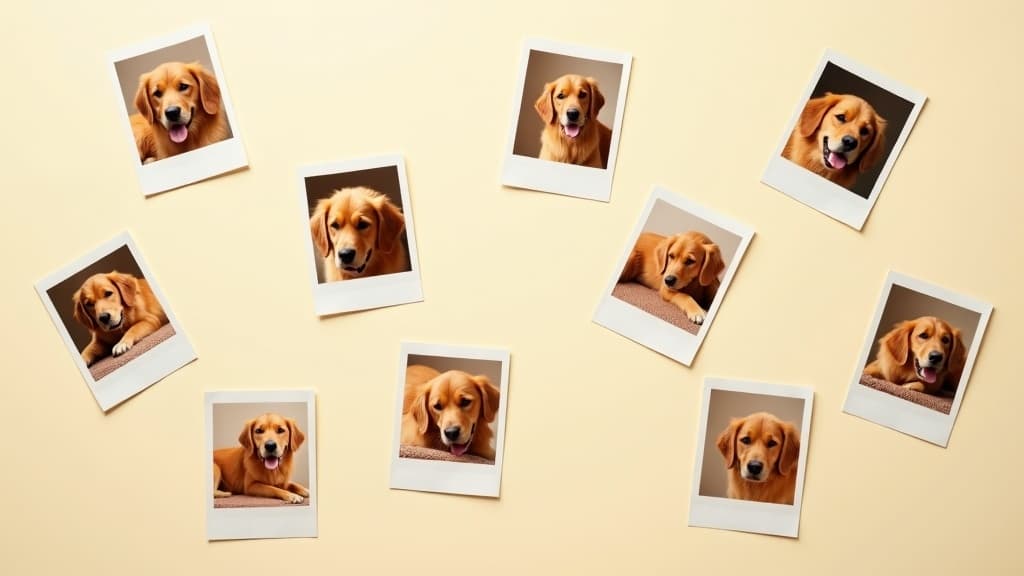
How to make AI pet portraits actually look like your dog
You've tried it. You typed "oil painting of a golden retriever in a flower field" into your favorite AI image tool. The result was beautiful — and unmistakably someone else's dog. Wrong face shape. Wrong markings. Same generic golden retriever you'd see on a stock-photo site.
That's not a failure of imagination. It's a failure of identity. The model has never seen your specific dog, so it has no idea what makes Haley different from any other golden. It paints a stereotype.
Here's the fix, and the exact 10 photos that get you there.
Why prompts (and even reference photos) fall short
Generic image models are trained on hundreds of millions of pictures of "a dog" — every breed, every angle, every style. That's why they're great at style and vibe. It's also why, by default, they have zero memory of your individual pet.
When you prompt them with "my dog in oil painting style", they fill in the gap with the average dog of that breed. The black smudge on Haley's ear? Gone. The slight underbite? Gone. The asymmetry that makes her look perpetually curious? Replaced with breed-standard symmetry.
Modern tools (ChatGPT-4o, Midjourney --cref, Stable Diffusion IP-Adapter) do let you attach a reference photo. That helps for a single generation in a similar style. It falls short across a series of styled portraits, because the reference is a hint, not a memory — each new prompt starts from scratch and the likeness drifts. We covered this in detail in Why generic AI tools can't generate YOUR pet.
A custom-trained model flips the relationship. Instead of asking the model to imagine a generic dog and nudging it with a photo each time, you teach it your dog's specific features once and then ask for any style. The art inherits the style; the subject is unmistakably yours, every generation.
Behind the scenes, this is a small adapter trained on top of a big general model. The technical name is a LoRA. You don't need to know the math. You just need to feed it the right photos.
The 10 photos that actually matter
Quality > quantity. Ten well-chosen photos beat fifty mediocre ones. The model is learning what's consistent across your photos — that's where identity lives.
Aim for this distribution:
1. Front-facing, eye-level, sharp focus
A clear straight-on portrait at your pet's eye level. This is the anchor photo. Their face takes up most of the frame. Both eyes visible. Sharp focus on the nose and eyes. No tongue out, no head tilt — give the model a "neutral" reference first.
2. Profile (left side)
Your pet looking sideways. The model needs to know the silhouette of the head and the shape of the muzzle from a true 90° angle. Take it at eye level, not from above.
3. Profile (right side)
Same shot, opposite side. Pets are often slightly asymmetric. Both sides matter. Skip this and your AI portraits will sometimes flip the wrong markings to the wrong side.
4. 3/4 angle (the most important one)
A 3/4 turn — somewhere between front-facing and profile. This is the most expressive single angle in portraiture, and it's what most styled portraits want as the source. If you only had one angle, this would be it. Take 2-3 of these, slight variations.
5. Full body, standing
The whole pet, head to tail, legs visible, ideally side-on or 3/4. The model uses this to learn body proportions: short-legged or tall, broad or slim, tail length, fur length on the legs vs the body.
6. Sitting
A relaxed sitting pose. Different body shape than standing. Tail position changes. This teaches the model that your pet's body adapts in expected ways.
7. Natural daylight, outdoor
A photo shot outside in even daylight (cloudy days are great — fewer harsh shadows). This shows the true colors of fur, eyes, and nose. Indoor lights tint colors warm or yellow; daylight is the ground truth.
8. Indoor / warm lighting
A clear photo under your normal indoor lights. The model learns that the same dog under different lighting is the same dog. This is what makes your portraits work in different artistic styles — because the model has seen your pet across lighting conditions.
9. Different background
A photo with a meaningfully different background — couch vs grass vs hardwood floor. Backgrounds vary. Teaching the model that your pet is the constant (not the carpet) is what stops it from accidentally painting your floor pattern into stylized portraits.
10. Genuine expression
One photo where your pet is doing the thing — the head tilt, the tongue-out grin, the side-eye, whatever your camera roll shows when you scroll for "best of". This is the photo that captures personality. The model will reach for it when you generate "watercolor portrait of my dog being themselves".
What to avoid (the killers)
These are the photos that quietly drag your model's likeness down. Skip them.
- Filtered or edited photos — Instagram filters, beauty filters, "enhance" buttons. The model learns the filter, not your pet. Use originals.
- Heavy shadows over the face — sun directly overhead, or a strong indoor light from one side. The model can't see the markings under the shadow, so it makes them up.
- Multiple animals in frame — even if your dog is centered, the model can pick up on the second pet's features. One pet per photo.
- Tiny pet, big landscape — if your dog is 200 pixels in a 4000-pixel frame, there's barely any signal. Pet should be at least half the frame.
- All from above (the iPhone problem) — every "good photo" most owners have was shot looking down at their pet. Top-down is a worst-case angle for portrait training. Get on the floor.
- Motion blur — even a great-personality photo, if it's blurry, teaches the model that "your pet" includes a blur. Cull the blurry ones.
- Costumes — Halloween outfits, sweaters, harnesses. These confuse the model about which features belong to your pet vs which belong to the accessory. Save those for after training, when you generate "in a wizard hat".
How to tell if it's working
After your model trains, generate the same simple prompt 3-4 times: a plain head-and-shoulders portrait in a neutral style ("studio portrait, soft lighting, neutral background"). Then compare to a real photo of your pet.
What you're checking:
- Face shape — does the muzzle length and head proportion look right?
- Eyes — are they the right color and shape?
- Markings — does that ear smudge or chest blaze appear in the same place?
- Vibe — does it feel like your dog when a friend looks at it?
If 3 out of 4 portraits feel right, you're trained well. Now you can generate in any style — oil painting, anime, superhero, holiday card — and the identity carries through because the model knows your pet first, then applies the style on top.
If portraits drift toward "generic breed", retrain with stronger photos: more 3/4 angles, more daylight, more variety.
Realistic expectations
A well-trained custom model gets the likeness right almost all the time and the personality right most of the time. It will occasionally produce a portrait that misses — usually a stylized one where the artistic exaggeration overpowers the identity. That's normal. Generate a few, pick the keepers. The hit rate for "this is unmistakably my dog" goes from ~5% on generic AI tools to ~70-90% on a model trained on the right 10 photos.
Try it on your pet
PawModel is a custom-model service for pet owners. You upload 10-20 photos following the guide above. We train a small adapter on your specific pet. You then generate portraits and short video reels in any style you can describe — and they actually look like your pet.
Start your pet's portrait — first model + 25 portraits is $14.99.